In this video I preview the possibility of making Death Knight Eyes dyeable. I firmly believe that this feature could be implemented in the game right now if Blizzard wanted to do such.
Now current as it stands, every Death Knight of every race uses the same texture for eyes and eye smoke, as previewed below.


The eyes are already coloured and pretty set in stone as blue, so in order to change that a little bit of finagling has to take place. Luckily however, simply changing the texture into black and white actually already does the trick here. But what is peculiar is the smoke texture here - you may notice that, if you're in game, the smoke texture is a blue, not a white. This texture works in a way of looping the texture and then controlling via shader the UV map where the coordinates will be over time. What we end up with is the following gif.

This is effectively how the texture becomes "animated," it's not actually that difficult. Each point on the UV map corresponds with a vertex point of the geometry. What's key to this is the way the colour is brought upon the smoke and how it fades off. It's actually rather creative at how it achieves this in one go.

this tiny little image is a gradient, ranging from the more dense, bright blue at the bottom, to a more transparent, faded blue at the top. The blue aspect of this image controls of course the colour of the smoke, while the Alpha (transparency) controls the fading effect of the texture. However, the area this effects the smoke stays locked in place, while the smoke texture continues to move upwards. This is how you achieve the illusion of smoke from the eyes.

This basic idea is set up using Blender Shading nodes and ultimately emulates the same behaviour.

We control the mapping location with the Y value changing over time (I usually find somewhere around -1 m per 250 frames per 60fps seems to be sufficient, but this may vary depending on the scale of your models.)
The alpha value of the smoke used to define what will be turned invisible, while the blue gradient will control the colour as well as give it an emission (glow) value. This is then thrown into a color ramp which just sort of helps control the effect of the gradient into information that the Mix Shader factor can process. Since the blue gradient texture is immobile, it stays.
There's a few other little things that go into making the ingame effect, but this is just meant as a more cursory look at how the process goes about making these eyes. The main idea to take home is that the actual smoke itself is not prebaked in with the blue texture, but rather it's coloured after the fact while it's being animated, which effectively means it's also a "dyed texture". Granted, the "dye" is a prebaked image, but that can easily be changed into a simple shader itself.
If "dyeing" a texture using a simple RBG colour picker value seems otherworldly for the WoW engine, it's actually been something in the game for some time now. Since Vanilla, pretty much every spell effect that isn't texture particles has been controlled by these colour values, no actual texture controls the blue-ness or green-ness of Lightning Bolt or Wrath. Many of the trailing effects of spells are also of this same effect.
Another example of this is the guild tabard and related guild icons and banners, or now-removed arena team logos. These options are premade colours, but are still nonetheless dyeable in the same sense.
However in order to make the Death Knight eyes dyeable, one more thing had to be done - turning the death knight eye colour into a grayscale image, which is just a fancy way of saying "making the image black and white." What we're left with is something akin to this image below:

Now, with these set up, something interesting can come about. These values can be given colour much the same way the smoke can. In addition, using some extra nodes, such as the ColorRamp, you can control which ranges of grayscale values belong roughly to each colour. If you treat "white" as the centre / pupil, and "black" as the outer sclera and iris edges, with inbetween as iris, you can achieve colouring each bit individually.


This is essentially how dyeing the grayscale texture back into the old Death Knight eye colour would look in this case. It would look as though nothing has changed. Each tick on the ColorRamp can be changed to different RBG values, therefore controlling the eye colour into virtually anything you desire.


And thus, any eye colour on a Death Knight can be achieved.
Whenever Blizzard adds a new eye colour option, it's implemented by adding a wholly new prebaked texture. What thus happens is that file is added into the game as an image texture, usually something along the lines of *_eye_color.blp. Currently this is the case for approximately 90 eye texture files. While it isn't a lot, the more they add will add up after all. This method is going to become increasingly taxing on computer disk space and VRAM usage. It's unlikely to ever actually be the "tipping point" of a machine to not allow it to run WoW anymore, but it could be optimised better.
This new method, controlling the colour via shaders, is effectively one grayscale image texture and colour via shader. This is massively more performance-friendly and would utlimately optimise the game, it could make that 1 or 2 fps difference. Do this for more textures, such as the almost ~300+ hair options, or the ~300+ skin textures, and you save a lot of file space and optimise the game immensely, especially as the main models in the game aside from the environment are character models.
Dyeing does not work for all aspects, however. While it's an often-requested feature, implementing dyeing for gear is not as easy and will require much, much more work. This isn't to say it isn't possible, after all Blizzard do have the original files they work with. They're able to make reskins of armour sets for each varying difficulty of raid and various quests and whatever else they have. It isn't as if they make those textures and they can no longer access them. It's hypothetically possible that each "layer" of armour piece that was worked with in the original files could be separated out to be made dyeable. However, the further back and older the armour set, the more difficult it probably will become to find these original documents, and many old files may not even be compatible for this method.
I am of course strongly of the opinion that heritage armour should have been designed with dyeing in mind. The amount of customisability that could come with such a feature would allow mixing heritage armour with virtually every single armour set in the game, which would have been a truly, racially unique, distinct, and something worth levelling a character to max level for. Artifact Weapons came very close to this feature, but alas the method that this was achieved was merely changing prebaked textures / appearances via a fancy Artifact user interface.
If I were to apply the shader method to armour as I did with the eyes above, the details of much of the armour would become washed out. However, using a shader method called "color shifting" could maybe, MAYBE result in better result. It would become very complicated to explain very quickly, but in an attempt to simplify, what this means is that the individual color values of a texture are mapped to a colour wheel, and this colour wheel becomes cyclic.
Taking this colour wheel as an example to explain below:
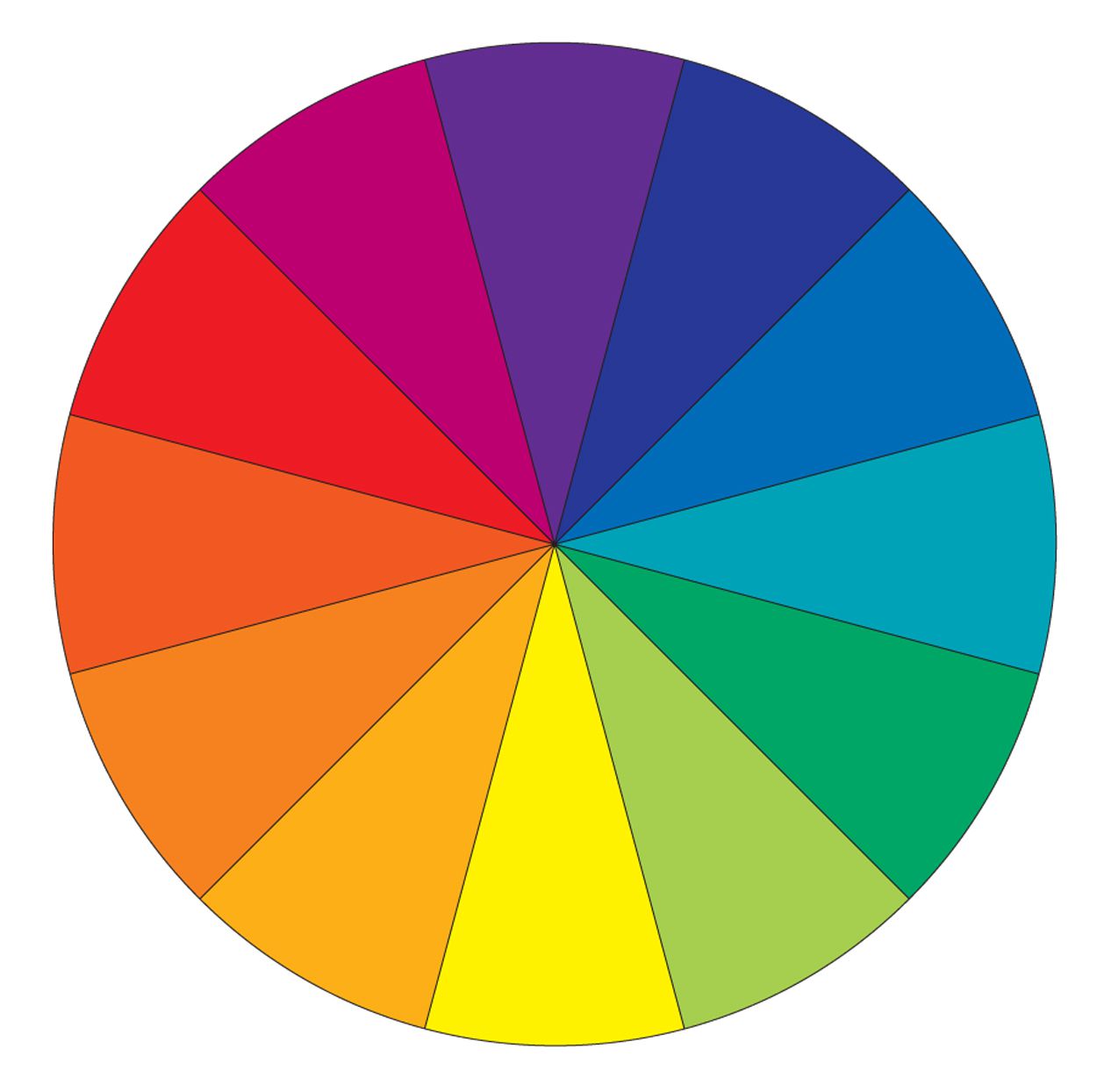
Let's take the colour purple at the top. If we were to shift this one value clockwise, we would get dark blue. In turn, this will shift every blue to green, every green to yellow, yellow to orange, orange to red, red to pink, and pink to purple, etc. This can be controlled in a very simple shift clockwise and anticlockwise, resulting in a variety of recolours. This is the "safest" method of maintaining colour values without completely washing away the originals, and can still retain the original values so long as you shift back to the original placement on the colour wheel. In this example, I'll display a colour shifted paladin chestpiece.

The middle image, the one used to dye hair / eyes, would not work so well for armour. The values are irretrievably lost and it probably wouldn't look too nice. It'd be much more niche in its usage, but allows for far more control over values. This would be best used for consistently-coloured objects, like hair, eyes, and even some skin colours which lack patterns (ie not tauren / vulpera friendly)
Colour shifting however allows it to retain approximate contrasts and differences between each value on a colour wheel, maintaining the basics of colour theory. However, this does not grant the user ultimate control over dyeing. If you intended to only change the gold to bronze, you've also unintentionally changed the blue gem to green and the purple secondary to blue, and the white neck piece remains almost entirely unchanged.
And so this is where I'll leave this post, I feel I've sufficiently explained quite enough for this method. Thank you for reading.