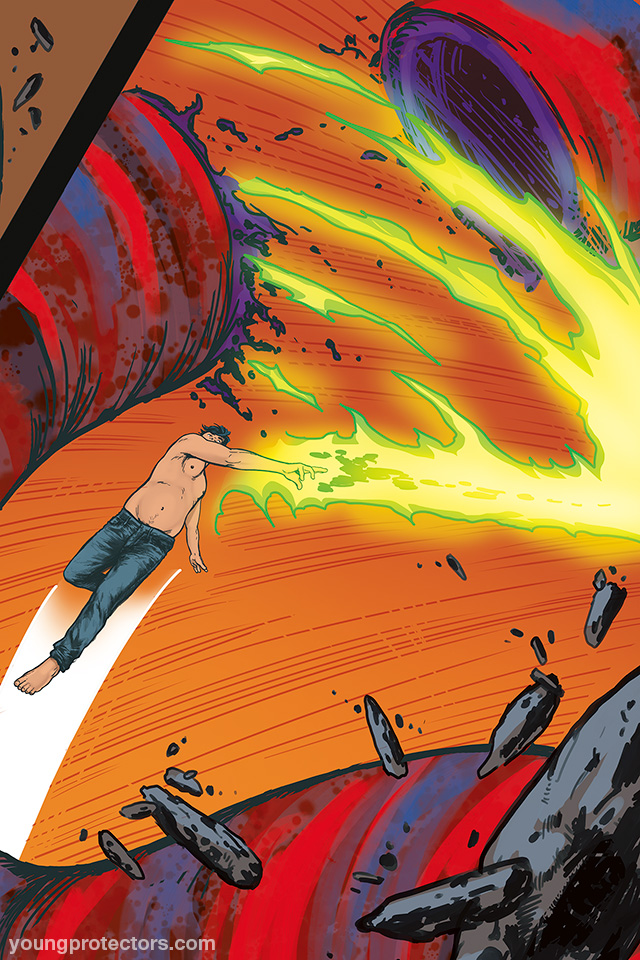
Last week, I asked you to vote for your favorite panel among the winners of previous Favorite Panel polls so I could make a pin-up that takes advantage of the extra resolution Vero has been sending me for the Legendary pages. And the results are in!
This was a close one! Y'all chose Page 20, Panel 2 as the winner with 38% of the votes! Second place goes to Page 22, Panel 4 with 36% of the votes. Page 21, Panel 4 came in third with 18% and Page 19, Panel 3 in last place with 9% of the votes.
Y'all wound up picking my favorite! So, very cool. :) (The others were quite nice, too, though.)
I've now prepared the art so you can use it as a wallpaper on your mobile. This was a little tricky because of the angle of the panel -- ultimately I decided to keep the little bit of panel 1 in the upper left. Hopefully, you'll like what I've done here. :)
You can download the winning panel pin-up wallpaper here:
http://downloads.yaoi911.com/AMW-COMICS-TYP-Legendary-3-Colors-Pg-20-Panel-2-640x960-EkVGs.jpg
There are high-res versions of this art for $25+ backers available via itch.io -- so if you'd like to see a version of these two pin-ups with over twice the resolution, you'll be able to do that here.
Please let me know what you think of this pin-up in the comments below!
More soon!
Alex
william clapie
2018-10-02 00:57:32 +0000 UTCAlex Woolfson
2018-10-01 20:17:49 +0000 UTCNadin Brokop
2018-10-01 19:29:04 +0000 UTC