![Process Post - Kar'niss / Female Cultist Adept [Baldur's Gate 3]](https://img5.samsuka.com/storage/7/jg/vh/c6f9d9-019e8f7a-d7c9-755d-a9e9-4a7c888c9502.jpg)
![Process Post - Kar'niss / Female Cultist Adept [Baldur's Gate 3]](https://img5.samsuka.com/storage/6/ph/io/c6f9d9-019e8f7a-d7d0-7702-bd47-7471af6e60e4.jpg)
![Process Post - Kar'niss / Female Cultist Adept [Baldur's Gate 3]](https://img5.samsuka.com/storage/5/ib/xo/c6f9d9-019e8f7a-d7db-76ad-b297-e0f581ec6536.jpg)
![Process Post - Kar'niss / Female Cultist Adept [Baldur's Gate 3]](https://img5.samsuka.com/storage/7/us/wb/c6f9d9-019e8f7a-d7e7-7773-897c-39577fcb6947.jpg)
![Process Post - Kar'niss / Female Cultist Adept [Baldur's Gate 3]](https://img5.samsuka.com/storage/1/rs/zm/c6f9d9-019e8f7a-d7f2-77d9-a6e7-b712ba24aacf.jpg)
![Process Post - Kar'niss / Female Cultist Adept [Baldur's Gate 3]](https://img5.samsuka.com/storage/3/jz/pb/c6f9d9-019e8f7a-d7ff-745c-bb0a-bd4221322680.jpg)
![Process Post - Kar'niss / Female Cultist Adept [Baldur's Gate 3]](https://img5.samsuka.com/storage/4/pv/ah/c6f9d9-019e8f7a-d80c-7bd9-bb3a-15c572af0b0b.jpg)
![Process Post - Kar'niss / Female Cultist Adept [Baldur's Gate 3]](https://img5.samsuka.com/storage/1/yp/px/c6f9d9-019e8f7a-d815-70ec-9bb3-b1120840244b.jpg)
![Process Post - Kar'niss / Female Cultist Adept [Baldur's Gate 3]](https://img5.samsuka.com/storage/10/qv/rp/c6f9d9-019e8f8a-1292-7f33-a8f0-fc0e15a77110.jpg)
![Process Post - Kar'niss / Female Cultist Adept [Baldur's Gate 3]](https://img5.samsuka.com/storage/7/jc/gr/c6f9d9-019e8f7a-d824-7b8d-bb28-d79b388af071.jpg)
![Process Post - Kar'niss / Female Cultist Adept [Baldur's Gate 3]](https://img5.samsuka.com/storage/1/xt/td/c6f9d9-019e8f7a-d838-79db-8164-c9c2296fcdd9.jpg)
![Process Post - Kar'niss / Female Cultist Adept [Baldur's Gate 3]](https://img5.samsuka.com/storage/5/ji/uo/c6f9d9-019e8f7a-d838-7e91-8f70-49d73ddace4b.jpg)
![Process Post - Kar'niss / Female Cultist Adept [Baldur's Gate 3]](https://img5.samsuka.com/storage/1/is/sb/c6f9d9-019e8f7a-d841-7457-b4fb-29d25503016b.jpg)
![Process Post - Kar'niss / Female Cultist Adept [Baldur's Gate 3]](https://img5.samsuka.com/storage/5/wd/zr/c6f9d9-019e8f7a-d843-7a51-bcb0-d4177ae3b502.jpg)
![Process Post - Kar'niss / Female Cultist Adept [Baldur's Gate 3]](https://img5.samsuka.com/storage/9/lr/kx/c6f9d9-019e8f7a-d84e-78c3-8fb1-c65875f8cf34.jpg)
![Process Post - Kar'niss / Female Cultist Adept [Baldur's Gate 3]](https://img5.samsuka.com/storage/9/ls/vx/c6f9d9-019e8f7a-d852-70cb-8d05-e93938a69554.jpg)
![Process Post - Kar'niss / Female Cultist Adept [Baldur's Gate 3]](https://img5.samsuka.com/storage/9/pn/kt/c6f9d9-019e8f7a-d854-7ab3-94f1-46cdba9bf2f7.jpg)
Happy Monday! It's process post time! ✨
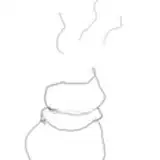
Excited to share this one with y'all! I think it's neat to see the adjustments etc. as they happen early in the process - i.e. I made some pretty big changes from thumbnail to the clean linework this time. There was a lot of 🕷spider leg math🕷 that needed to happen, and I even needed to shift the whole damn camera angle to make things make sense lolol. Things started with a bit more of a top-down and almost fisheye-type view, but between sketch 2 - 3 you can see where I realized that wasn't gonna quite work for my purposes 🤭
Some general musings: This was definitely one of those pieces where I'm grateful that I've long since switched to doing the flats in greyscale first, rather than jumping straight into color like I used to back in 2022-2023. There was just a lot going on w/ this piece, especially with Kar'niss' body textures, and Old Me would have gotten a bit overwhelmed having to sort out where the textures and value changes go AND choose colors in the same stage, hahah.
On a related note - I've also done myself some favors more recently with moving to a linework approach where I do the 'major outlines' first. (You can see some examples of this in the last few detail shots on this post) I've started designating elements as important shapes to separate and define, i.e. clothing from the body, one body from another, things in the foreground, hair, etc. and outline those with a thicker line, then duplicate that layer - before tackling the "detail" lines on a different layer at a lower opacity. It makes everything SO much more approachable to deal with, and easier to parse after the fact. Tackling the 'major outlines' first means I always know where to start/what to prioritize, which majorly helps when there's a lot going on in a piece like this one. It also gives things a cleaner + more intentional look overall!
With the 'detail lines' on a separate layer, I've got the added bonus of being able to change the layer mode on those depending on how prominent I want them to be in the final. My favorite mode for those is usually Soft Light, which makes them slightly colorized based on what flat colors I have beneath them!
---
FYI: If you’re new to my Patreon or just happened to miss it, I shared a detailed tutorial for my overall process HERE back in June 2024, so check that out if you want specific insights into how I work in Procreate! I've made some smaller tweaks to my process since then, so I may do another updated tutorial this year, but the big stages/general approach still applies.
I also have a collection of all my previous WIP previews, process posts, and tutorials HERE!
That aside, I’m very happy to answer process-related questions in comments or DM (I like to yammer about art stuff 🤭) so don’t be shy if you’re curious about anything I haven’t gotten into!

























![[AI]久保翠&克勞蒂雅](https://samsuka.com/istorage/65716.jpg)