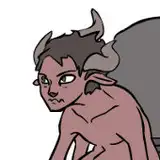
Real life hits us like a train sometimes. Like everyone else we guess for sure. But we will not let you down. Even if we have no time left due our jobs chaining us to long hours in the "real world" we give our best to satisfy your needs here. So basically firstly heres a WIP picture of the upcoming new S&D title we are working hard on. This is going to be great!
Secondly in order to finish this month with something cool we made an enhanced version out of the "burry him" MoCap. An other Model, tweaked physics and some post magic effects make this one worthy looking twice! Oh and its in the VAC format now of course ;)
PS: If you exchange the model within the scene make sure to deactivate the post magic filters added after replacing the model ( located in the models plugins tab). Its a bug.
Have a great day!
Gato
INSTALLATION
1.) Download & Drop the C&G-Studio folder inside your AddonPackages folder.
2.) Download all relevant .var files from the list below and drop them into your AddonPackages folder ( only if you don´t already have the var files below! )
3.) Inside VaM just open up the .var file located in the C&G-STUDIO folder (stored in AddonPackages)
4.) Ready to go!
ATTENTION
-> BY OPENING THE SCENE INSIDE VAM IN ORDER TO FIND THE VAR FILE ALWAYS CHECK ON THE LEFT SIDE TAB AND SEE "LATEST"!
-> In order to get the full experience it is recommended to have all the var files listed below
MOCAP FILE
LINKS TO RELEVANT VAR FILES
CLOTHING
SupaRioAmateur - Tifa Cloth Pack 1
TGC - Artemis Dress by Studio Art Vartanian
Hunting-Succubus - EyeBall Shadow, Tear WetLine, Reflection! (version:4)
Technical information & limitations
* Make sure to have at least 35-45 FPS in order to stay synced with the audio
* Freeze motion before scene load & let everything load up first
* Disable soft body physics if you notice big FPS drops or crashes
* Use the RESTART button with caution ( only push if model is in a similar position to the start position eg. not backwards)
Schlong
2020-09-05 05:26:26 +0000 UTC