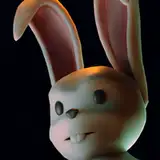
So, it's time for the final phase of production on the easter bunny picnic animation, and it's got a title now! Playdate!
So, first let's take a look at rendering and editing. This process has been an amazing stress-test for the systems I have set up, and it's also required me to come up with a load of new workflows!
First off, for anyone using blender to render a non-trivial amount of animation and doesn't already know, allow me to introduce Flamenco:
 Flamenco is an incredibly powerful and easy to set up self-hosted render server system mostly written by Dr Sybren A. Stüvel, one of the main developers at the blender foundation. I cannot overstate how freeing it is to have a system in place that just manages all the renders reliably and simply, instead of the manual jank labyrinth of remote access and batch files I was using up until about 2023. I've been set up with flamenco for a while, but playdate is the project where it's really shined, and I don't think it would have been possible without it. I looked into a bunch of other alternatives before, and simply none of them really worked as seamlessly as flamenco does.
 For my system, I've also written a little javascript program with node.js that runs alongside, periodically checks the statuses of the jobs and automatically sends me a discord message on a private server when something goes wrong! Super helpful, and much cheaper than a commercial remote monitoring system. This is all running on a cheap little optiplex PC I keep in a cupboard, just set it and forget it (except when windows updates it and brings everything down).
The core concept of the video edit is the music, and the animation being synchronized with the beat. Part of that means a lot of synchronization work at the animation stage in blender, juggling multiple loops and linear sections across each timeline. blender has a marker system that is invaluable for keeping track of this:
 Somewhat foolishly, I settled on a 110 BPM tempo, after looking for music I liked for a long time. My advice to anyone who cares: Do not do this, if you can avoid it. at 110 bpm, I have to animate at 22 fps - blender does this quite happily, but video editors mostly don't. when is the last time you watched an mp4 file that plays at 22 fps? It's possible, actually the format supports basically any format, but most video editing is locked to the common framerates of 24, 25, 29.97 (ugh), 30, 48 and 60. So, in davinci resolve I have to retime every clip to play at 22 fps, otherwise the audiovisual sync drifts rapidly.
 Weirdly enough, davinci resolve also doesn't have a looping feature built-in to its clips, so I have to duplicate the clip 30 times and feel like a caveman - this takes time, but also makes the process a bit unwieldy since I can't change anything about all of them at once. All of this combines to make the process of transferring, ingesting, and setting up all the shots to be ready to edit actually quite time consuming, and it's very necessary to stay organized.
 For my other projects so far that include sound, my editing methodology has been pretty basic, so I haven't mentioned it much. I find sounds, sync them up with the action on various tracks, and then apply some effects like EQ and reverb as needed to those tracks to roughly simulate the environment where the action is happening.
For a project the size of playdate, this approach becomes untenable. At time of writing, the finished part of the edit contains 42 discreet looping sections, each of which has on average 3-4 different angles to cut between. If the average loop period is 110 bpm and each section plays for 20 seconds, that's 1440 individual actions that need sound effects synchronized with them, and 126-168 individual configurations of the soundscape that need to accompany each camera angle accounting for location, distance to subject, the energy of the action, etc. If I were to go through and apply apply these tweaks from scratch to every section, and re-apply them every time I moved or tweaked something... I'd probably still be editing next year.
 The one advantage I have on playdate is that all the animations are pretty much locked down on 110 bpm, to synchronize with the music - some of them are doubletime, some are halftime, but it's all the same tempo. That means what I can do is create a series of compound clips with sound effects pre-synchronized to that beat, and then use those clips across all the other loops in the project.
 Each loop gets its own compound clip, where I do all the looping and synchronization, so then I can use those compound clips in the main timeline where I'm doing the edit, and no matter what I do, the sound effects will stay synchronized with the action.
 But it doesn't end there! Most NLE's (like final cut or premier pro) have a multicam or multi-view editing workflow, and davinci resolve is no different. I can take the compound clips I make for each shot, and then add them to a multicam clip, which is an incredibly neat way to manage all the angles in a single section.
 That's great, but the real game changer is when we combine these ideas: compound clips in davinci resolve can be treated as entire timelines in their own right, with all the tracks and effects you please. So if I do all the soundscape stuff I mentioned before in each of the compound clips, it's very easy and neat to do, and now the multicam clips will have that modulation in them too, it carries over! In short, when I cut from the wide shot to the close shot, I can have it set up so the sound gets louder and clearer without having to re-arrange a bunch of stuff every time!
 Maybe that was very interesting to you, maybe it was intolerably dry and your eyes glazed over! As a reward for getting through it, check this out:

 Remember, we're making porn here?
These are some "quick cut" shots I've been making to sprinkle into the edit and spice things up, but since I've been making them all in their own file, the effect of playing them back-to-back like this is actually quite interesting. I want to experiment a bit more with this kind of "format", I think...
Finally, what are the stats on playdate? Well, it's getting hard to count. I could give pretty accurate figures for study break and witching hour, but during the production of playdate I have had to delete a lot of obsolete renders and job files on a couple of occasions to prevent my SSDs from filling up. There also aren't any lasting records of how long each shot took to render, I think on future projects I'll want to work out a better system of record keeping, because it makes me curious.
At the moment, the final directory of raw renders is 190GB in size. That's over 200 render jobs, running pretty much 24/7 across two or three machines for the last four months. Back of the napkin, that adds up to something like 7-10 thousand hours of GPU time (and about $700 in raw electricity costs). 30,000 frames rendered at 4K, for a total raw runtime of 1,364 seconds or roughly 22 minutes of "raw footage"! (before you get too excited, though, most of that didn't get used, because it's broken or duplicate in one way or another.)
That's.... quite a lot! Honestly the size of this project is starting to make my knees a little wobbly. I feel like I've been building a tower while climbing it, and now it's tall enough that I'm getting vertigo when I look down. I'm used to having intimidating tasks ahead of me, but having such a huge volume of work behind... that's a pretty new, head-spinning kind of feeling.
I hope you guys enjoy watching it as much as I've enjoyed making it! One more WIP to come, talking about the simulation and techanim I've been doing to finish it off. I decided to split this update into two parts.
Tyler Wilson
2025-03-23 17:45:13 +0000 UTC